
What is Watershed Mail?
Watershed Mail is a built-in secure messaging tool that enables you to:
- Communicate with other Watershed users
- Share patient information securely (including PHI)
- Keep communication tied to a patient record when needed
✅ Best Practice: Use Watershed Mail for any patient-related communication instead of external email to maintain compliance and visibility.
Who Can Enable Watershed Mail?
Only Manage Users can grant access to Watershed Mail.
Enable Watershed Mail for a User as a Manage User
- Log in to Watershed with a Practice Administrator role
- Click the Admin tab at the top of the screen
- Select Mail from the left-hand Tools menu
- Check the box under Individual Mail for the appropriate user
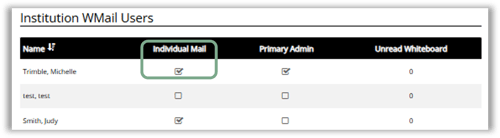
⚠️ Important:
If a user does not have this box checked, they will not see or access Watershed Mail.
How to Access Watershed Mail
You can access Watershed Mail in two ways depending on your workflow:
Option 1: From the Navigation Bar
- Click Mail from the top navigation menu

Option 2: From a Patient Record
- Search for a patient (name, DOB, SSN, or phone)
- Click the patient name to open their record
- Hover over Messaging
- Click Mail
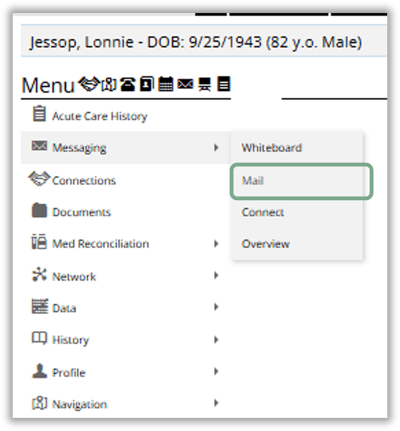
💡 Tip:
Accessing Mail from a patient record makes it easier to connect your message to the correct patient.
How to Send a Message
Compose and Send Watershed Mail
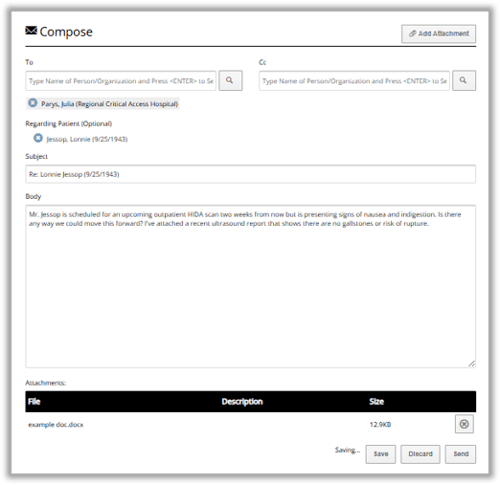
- Click Compose Mail
- Search and select the recipient
- (Optional) Link the message to a specific patient
- Enter your message
- Add any relevant attachments
- Click Send
✅ Best Practices
- Always verify the recipient before sending PHI
- Link messages to a patient record whenever applicable
- Include attachments when supporting documentation is needed
⚠️ Important:
Messages sent through Watershed Mail are intended for internal Watershed users only—ensure the recipient is in the system.
Troubleshooting & Support
Not seeing the Mail option?
- Confirm that Individual Mail access is enabled (see steps above)
- Reach out to your organization’s Manage User